Sailing the AI Waves: Configuring AGFC as a Secure Inference Gateway on AKS
Running standard microservices on Kubernetes is like sailing a well-mapped route. But hosting Large Language Models (LLMs) like Qwen or Llama on Azure Kubernetes Service (AKS)? That is like navigating uncharted, stormy waters.
AI inference workloads do not behave like traditional stateless HTTP applications. Requests are highly resource-intensive, unpredictable, and tightly bound to expensive hardware constraints like GPU accelerator availability, KV cache allocation, and request queue depth.
Working daily with complex Kubernetes clusters, I see platform teams making the same mistake over and over: treating an AI model server like a standard web app. If you use traditional round-robin load balancing to route a heavy prompt to a GPU replica that is already saturated, your Time to First Token (TTFT) skyrockets, timeouts pile up, and expensive compute sits idling elsewhere.
Even worse, exposing self-hosted model runtimes directly to the network presents a massive security vector. In a world where raw AI prompt consumption directly translates to infrastructure costs, allowing uninspected or malicious traffic to hit your GPU clusters is a fast track to denial-of-service states and completely drained budgets.
This is where the new Public Preview of Microsoft’s Application Gateway for Containers (AGFC) – AI gateway / Inference gateway steps in. It fundamentally bridges the gap between raw Kubernetes infrastructure, model-aware traffic routing, and enterprise-grade edge security.
In this article, I want to explore this new capability from a practical Platform Architecture and Security perspective. First, we will break down how the Kubernetes Gateway API Inference Extension redefines cloud-native AI routing. Then, we will walk through a complete, real-world deployment utilizing a vLLM engine hosting a Qwen2.5 model, complete with smart endpoint picking and request prioritization.
Shifting from Simple Services to InferencePools
Traditional Kubernetes ingress controllers inspect Layer 7 paths or Layer 4 connections to answer a basic question: Is the backend pod healthy? If yes, it gets traffic.
An AI gateway needs to ask completely different questions before routing an expensive request:
- What specific model family is the client requesting inside the encrypted JSON body?
- Which GPU replica has the lowest queue depth or highest KV cache prefix-affinity right now?
- Is this request an interactive real-time chat or a low-priority background batch job?
If you try to solve this with standard Kubernetes Service abstractions, you are forced to build, maintain, and patch a complex custom reverse-proxy tier (like dedicated sidecars or routing proxies) inside your cluster.
AGFC’s inference gateway solves this by natively adopting the open-source Kubernetes Gateway API Inference Extension (v1.3.1). Instead of custom ingress rules, it brings native, AI-aware abstractions directly into your cluster control plane using Custom Resource Definitions (CRDs).
The Architecture: Telemetry-Driven Decisions at the Edge
When you enable the AI gateway capabilities (aiGateway=true) on the AGFC ALB Controller, the data path changes completely. It moves away from basic load balancing to an intelligent, multi-layered decision engine:
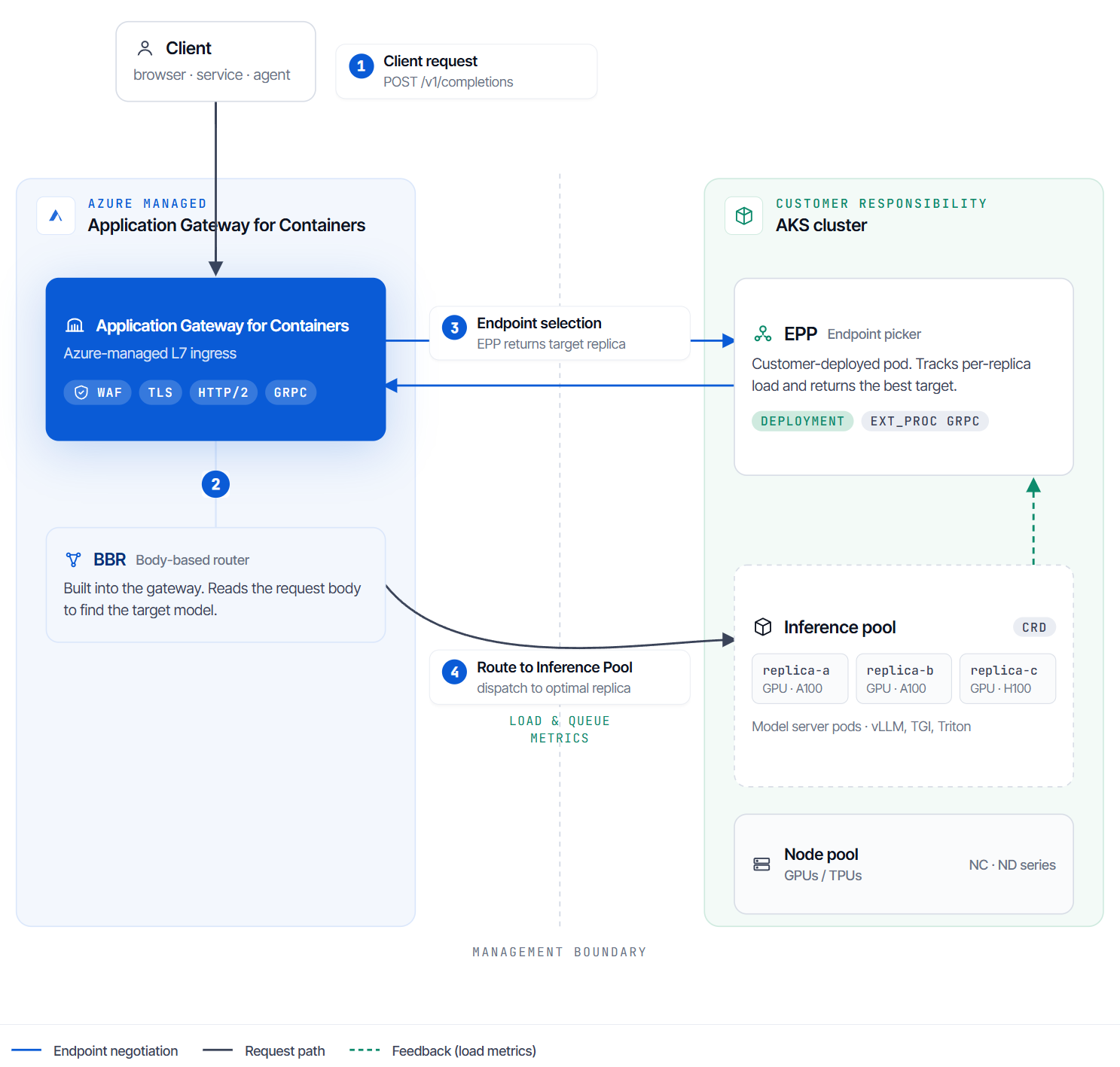
- Managed Body-Based Router (BBR): Operating natively at the Azure edge, this processor inspects incoming OpenAI-compatible requests (like
/v1/chat/completions). Without requiring any separate proxy tier in your cluster, it extracts the target model name from the request payload and surfaces it as a header for routing decisions. - Endpoint Picker (EPP): A lightweight, specialized scheduling extension running inside your AKS cluster. The EPP continuously watches the model server pods, reads engine-specific metrics (such as
vllm:num_requests_waitingandkv_cache_usage_perc), and instantly guides the AGFC data plane to the optimal pod replica. - InferencePool: The new backend abstraction resource that links your model server deployments directly to the EPP scoring engine.
The Security Layer: Shielding Expensive Backends
As an engineer focused on aligning Azure infrastructure with rigorous security practices, what excites me most about this architecture is its native cohesion with Azure’s Web Application Firewall (WAF).
Because the WAF evaluates traffic at the managed edge before it ever triggers the BBR or EPP layers, OWASP-aligned protections are applied to your generative AI traffic instantly. Malicious payloads, automated prompt injection vectors, or unauthorized bursts are dropped at the perimeter. This shields your scarce, high-value GPU instances from malicious actors attempting to exploit backend execution models or inflate your cloud bill.
Setting Up the Inference Gateway on AKS
Let’s stop talking theory and implement a secure, model-aware inference path. In this walkthrough, we will deploy a real vLLM instance serving the Qwen/Qwen2.5-0.5B-Instruct model on GPU nodes, backed by the Gateway API.
Prerequisites
Before proceeding, ensure you have:
- The
AllowApplicationGatewayForContainersInferenceGatewaypreview feature registered on your Azure subscription. - The AI gateway feature enabled on your ALB Controller (Helm:
albController.aiGateway=true). - An AKS cluster with a schedulable GPU node pool running the NVIDIA device plugin.
- A Hugging Face read-access token to fetch the Qwen model.
Step 1: Prepare the Namespace and Secrets
We start by creating an isolated namespace for our AI workloads and storing our Hugging Face hub token securely:
NAMESPACE='inference'
HF_TOKEN='your_huggingface_token_here'

kubectl create namespace $NAMESPACE

kubectl create secret generic hf-token \
  --namespace $NAMESPACE \
  --from-literal=token=$HF_TOKEN
Step 2: Deploy the vLLM Model Server
Next, we deploy our vLLM instance. Notice the critical label inference.networking.k8s.io/engine-type: vllm, which tells the system how to interpret the runtime metrics. We also add a startupProbe to prevent the container from being killed while downloading large model weights.
Create vllm-deployment.yaml:
apiVersion: apps/v1
kind: Deployment
metadata:
  name: vllm-qwen2-5-0-5b
  namespace: inference
  labels:
    app: vllm-qwen2-5-0-5b
spec:
  replicas: 1
  selector:
    matchLabels:
      app: vllm-qwen2-5-0-5b
  template:
    metadata:
      labels:
        app: vllm-qwen2-5-0-5b
        inference.networking.k8s.io/engine-type: vllm
    spec:
      containers:
      - name: vllm
        image: vllm/vllm-openai:latest
        imagePullPolicy: Always
        command: ["python3", "-m", "vllm.entrypoints.openai.api_server"]
        args:
        - "--model"
        - "Qwen/Qwen2.5-0.5B-Instruct"
        - "--port"
        - "8000"
        - "--max-model-len"
        - "2048"
        - "--gpu-memory-utilization"
        - "0.8"
        env:
        - name: HUGGING_FACE_HUB_TOKEN
          valueFrom:
            secretKeyRef:
              name: hf-token
              key: token
        ports:
        - containerPort: 8000
          name: http
          protocol: TCP
        startupProbe:
          httpGet:
            path: /health
            port: http
          periodSeconds: 10
          failureThreshold: 60
        readinessProbe:
          httpGet:
            path: /health
            port: http
          periodSeconds: 5
          failureThreshold: 12
        resources:
          limits:
            nvidia.com/gpu: "1"
          requests:
            nvidia.com/gpu: "1"
        volumeMounts:
        - mountPath: /dev/shm
          name: shm
      tolerations:
      - key: "sku"
        operator: "Equal"
        value: "gpu"
        effect: "NoSchedule"
      - key: "nvidia.com/gpu"
        operator: "Exists"
        effect: "NoSchedule"
      volumes:
      - name: shm
        emptyDir:
          medium: Memory
Apply the deployment and wait for the model to fully load into the GPU memory:
kubectl apply -f vllm-deployment.yaml
kubectl rollout status deployment/vllm-qwen2-5-0-5b -n $NAMESPACE --timeout=900s
Step 3: Deploy the InferencePool and Endpoint Picker (EPP)
To connect the backend pods to the AGFC intelligent routing fabric, we deploy the official Kubernetes Gateway API Inference Extension Helm chart.
Note: The chart automatically names the InferencePool after the Helm release. Do not create the pool manually before running this command to prevent ownership conflicts.
helm upgrade --install "vllm-qwen2-5-0-5b" \
  --namespace "$NAMESPACE" \
  --set "inferencePool.modelServers.matchLabels.app=vllm-qwen2-5-0-5b" \
  --set "inferenceExtension.image.tag=v1.3.1" \
  --set "provider.name=none" \
  --version "v1.3.1" \
  oci://registry.k8s.io/gateway-api-inference-extension/charts/inferencepool
Verify that the EPP deployment is fully available and that the pool status is accepted:
kubectl rollout status deployment/vllm-qwen2-5-0-5b-epp -n $NAMESPACE --timeout=180s
kubectl get inferencepool vllm-qwen2-5-0-5b -n $NAMESPACE -o yaml
Step 4: Configure the Gateway and HTTPRoute
Now, we define the ingress boundary using the standard Gateway API specs. We map our /v1 traffic directly to our InferencePool backend resource.
Create inference-ingress.yaml:
apiVersion: gateway.networking.k8s.io/v1
kind: Gateway
metadata:
  name: ai-gateway
  namespace: inference
  annotations:
    alb.networking.azure.io/alb-namespace: alb-test-infra
    alb.networking.azure.io/alb-name: alb-test
spec:
  gatewayClassName: azure-alb-external
  listeners:
  - name: http
    protocol: HTTP
    port: 80
    allowedRoutes:
      namespaces:
        from: Same
---
apiVersion: gateway.networking.k8s.io/v1
kind: HTTPRoute
metadata:
  name: vllm-qwen2-5-0-5b
  namespace: inference
spec:
  parentRefs:
  - name: ai-gateway
  rules:
  - matches:
    - path:
        type: PathPrefix
        value: /v1
    backendRefs:
    - group: inference.networking.k8s.io
      kind: InferencePool
      name: vllm-qwen2-5-0-5b
Apply the routing fabric to the cluster:
kubectl apply -f inference-ingress.yamlStep 5: Validating the Smart Data Flow
Let’s fetch the public IP address of the Application Gateway for Containers and fire an OpenAI-compatible completion payload using curl:
# Fetch the dynamically assigned public ingress IP
GATEWAY_ADDRESS=$(kubectl get gateway/ai-gateway -n $NAMESPACE -o jsonpath='{.status.addresses[0].value}')

# Execute an inference request
curl -i http://${GATEWAY_ADDRESS}/v1/chat/completions \
  -H 'Content-Type: application/json' \
  -d '{
    "model": "Qwen/Qwen2.5-0.5B-Instruct",
    "messages": [{"role": "user", "content": "What is 2+2? Answer in one word."}],
    "max_tokens": 10
  }'
When everything is aligned and the backend pod is fully Ready, you will receive a clean HTTP/1.1 200 OK response with the token completion answers directly generated by Qwen.
Going Advanced: Prioritizing Critical Traffic
To ensure real-time web users don’t suffer from lagging responses because of bulk background batch jobs, we can enforce strict routing priorities using the experimental InferenceObjective CRD:
apiVersion: inference.networking.k8s.io/v1alpha1
kind: InferenceObjective
metadata:
  name: critical-chat-traffic
  namespace: inference
spec:
  poolRef:
    group: inference.networking.k8s.io
    kind: InferencePool
    name: vllm-qwen2-5-0-5b
  priority: 10
By passing the custom header -H 'x-gateway-inference-objective: critical-chat-traffic' from your user interface workloads, the EPP scheduler automatically prioritizes this execution thread and sheds background queue stress when the GPU node hits high saturation levels.
You can test and verfiy this priority routing behavior directly with the following execution payload:
curl -i http://${GATEWAY_ADDRESS}/v1/chat/completions \
  -H 'Content-Type: application/json' \
  -H 'x-gateway-inference-objective: critical-chat-traffic' \
  -d '{
    "model": "Qwen/Qwen2.5-0.5B-Instruct",
    "messages": [{"role": "user", "content": "What is 2+2? Answer in one word."}],
    "max_tokens": 10
  }'
Closing Words
As Platform Engineers and Architects, we cannot treat AI infrastructure like the workloads of yesterday. Shifting from blind Layer 4 network routing to telemetry-driven, model-aware traffic coordination is the absolute foundation for keeping application latencies low and hardware budgets sustainable.
The Public Preview of the AI Inference Gateway capability in Azure Application Gateway for Containers provides an incredibly elegant solution. By utilizing standardized Gateway API specifications and layering them with enterprise-grade edge WAF protection, platform teams can now confidently govern generative AI workloads at scale.
The structural blueprint remains simple:
- AKS schedules and provides the underlying GPU capacity.
- vLLM exposes robust, OpenAI-compatible engine metrics.
- InferencePools & EPP dynamically schedule traffic based on actual node stress.
- Azure WAF & AGFC secure and streamline the data path at the cloud perimeter before a single prompt can drain your budgets.
Thank you for taking the time to explore this guide! Stay tuned, because as we push deeper into cloud engineering, we will continue exploring how to seamlessly merge cutting-edge Azure architectures with ironclad Security practices.
Author: Rolf Schutten
Posted on: July 5, 2026